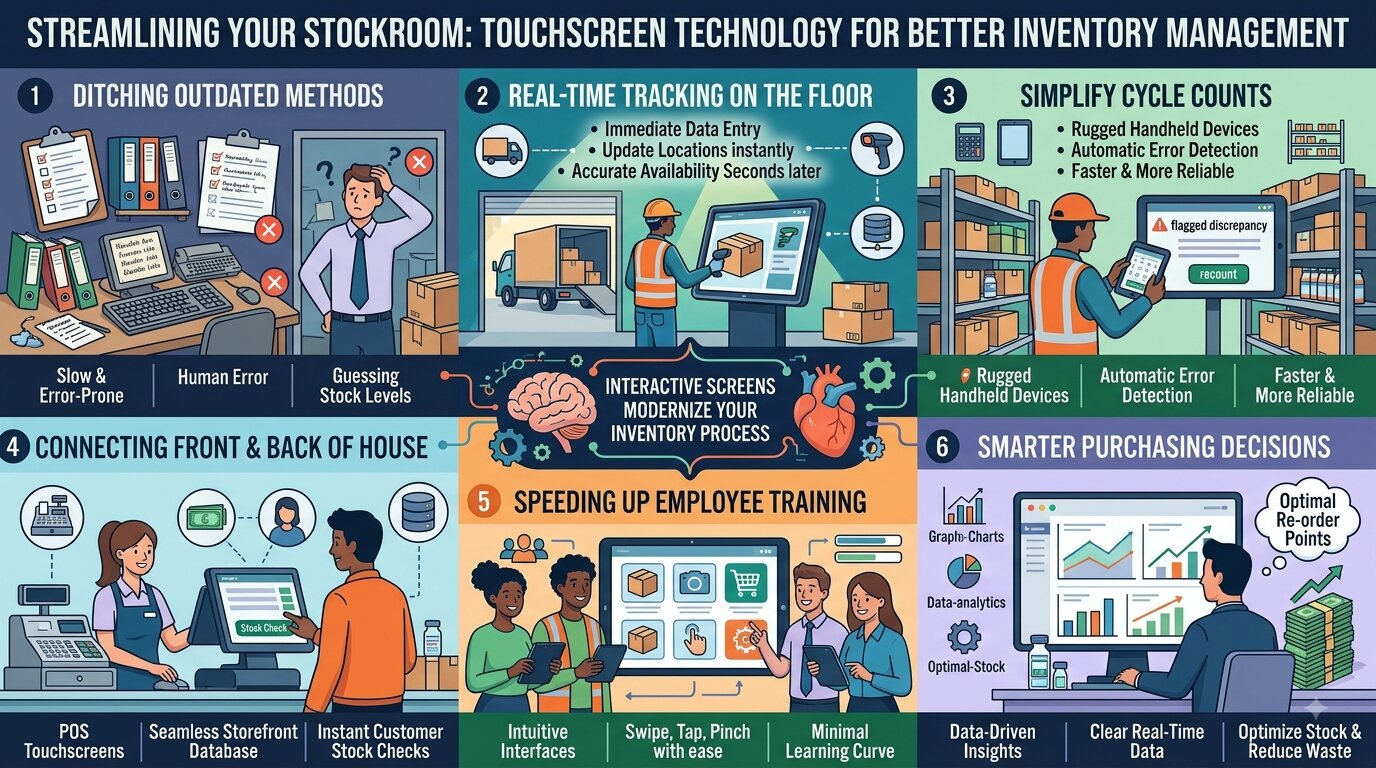

Running a business often feels like a constant balancing act, and keeping track of inventory’s usually the most stressful part. Whether you manage a busy retail store, a bustling restaurant, or a growing warehouse, losing track of your stock leads to lost sales and frustrated customers. For decades, managers relied on clipboards, printed spreadsheets, and manual data entry to figure out what was sitting on the shelves. This outdated method is slow, prone to human error, and leaves you guessing about your actual stock levels by the end of the day.
Fortunately, businesses are finding a much better way to handle their stockrooms. By integrating touchscreen technology into your daily operations, you can completely transform how you track, count, and manage your inventory. Moving away from clunky keyboards and fragile paper records gives your team the power to update stock levels in real time with just a few simple taps. If you’re tired of playing guessing games with your products, let’s explore how interactive screens can modernize your entire inventory process.
Real-Time Tracking on the Floor
When your employees are unloading a new shipment or pulling items to fulfill an order, asking them to write down numbers on a piece of paper just slows them down. Those handwritten notes then have to be deciphered and typed into a back-office computer hours later. This delay means your inventory system is never truly accurate during business hours.
By installing interactive panels at receiving docks or equipping your staff with durable, handheld touch devices, you eliminate that delay. As soon as a box comes off the delivery truck, an employee can tap the screen, scan a barcode, and instantly log the new items into your central system. If a product gets moved from the back room to the sales floor, a quick swipe updates its location. This immediate data entry ensures that everyone, from the warehouse manager to the front-end cashier, always has an accurate picture of what’s available right that very second.
Simplifying the Dreaded Cycle Counts
Anyone who has worked in retail or warehousing knows the dread of a full inventory audit. Counting every single item in the building usually requires late nights, overtime pay, and a lot of headaches. Even smaller, daily cycle counts can disrupt your normal workflow if your team has to constantly refer back to a printed master list to see what they’re supposed to be checking.
Modern touch displays simplify these audits beautifully. Instead of carrying a binder, your staff can walk the aisles with a rugged tablet. The screen displays exactly which items need to be counted that day. As they tap in the numbers, the system automatically flags any discrepancies between the physical count and the digital records. If the numbers don’t match, the employee can recount the shelf immediately rather than waiting for a manager to catch the error on a spreadsheet three days later. This seamless process makes cycle counts significantly faster and much more reliable.
Connecting the Front and Back of the House
Inventory management doesn’t just happen in the stockroom; it happens at the cash register, too. In a busy retail environment, the disconnect between what’s selling out front and what’s sitting in the back is a common source of stress. When a customer asks if you have a specific shirt in a different size, you don’t want your employees wandering around a messy stockroom for ten minutes just to come up empty-handed.
Using modern point-of-sale touchscreens connects your storefront directly to your inventory database. Every time a cashier taps the screen to complete a sale, that item’s instantly deducted from the master inventory count. If a customer asks about a product, the employee can use that same interface to check the stockroom levels without ever leaving the customer’s side. If you run multiple locations, they can even tap the screen to see if a nearby store has the item in stock, saving the sale and keeping the customer happy.
Speeding Up Employee Training
High turnover is a reality in many fast-paced industries, meaning you’re probably training new employees regularly. Teaching a new hire how to navigate a complicated, keyboard-based legacy software system takes days of valuable time. They have to memorize specific keystrokes, shortcut codes, and confusing menu layouts just to perform a simple stock check.
On the other hand, almost everyone already knows how to use a touch interface. We all interact with smartphones and tablets every single day. When you introduce touch-enabled devices into your warehouse or store, the learning curve practically disappears. New hires can intuitively swipe, tap, and pinch their way through your inventory software within their first few hours on the job. The visual nature of a touch interface allows them to select large icons and clear photos of the products rather than typing out long identification codes. When your system is this easy to use, your staff will actually use it correctly, leading to much better data accuracy across the board.
Making Smarter Purchasing Decisions
Keeping your inventory accurate shouldn’t feel like an impossible puzzle. When you rely on outdated tools, you’re holding your business back and creating unnecessary stress for your team. Upgrading to intuitive, touch-based hardware connects every part of your operation, from the receiving dock to the checkout counter. It cuts down on frustrating errors, speeds up your daily audits, and gives you the clear, real-time data you need to make smart purchasing decisions. Ditch the old clipboards and bring your inventory management into the modern era.
For more coverage on this topic, see related articles on our publishing site.